https://dev-dx2d2y-log.tistory.com/218
[백엔드] 로그인 시의 SecurityFilterChain의 동작과정
https://dev-dx2d2y-log.tistory.com/217 [백엔드] Spring Security 첫 걸음 - DelegatingFilterProxy, FilterChainProxy로 Web Context Filter에 Spring Bean Filter 등DelegatingFilterProxy그 전에 그냥 HTTP 요청이 어떻게 처리되냐면..클라
dev-dx2d2y-log.tistory.com
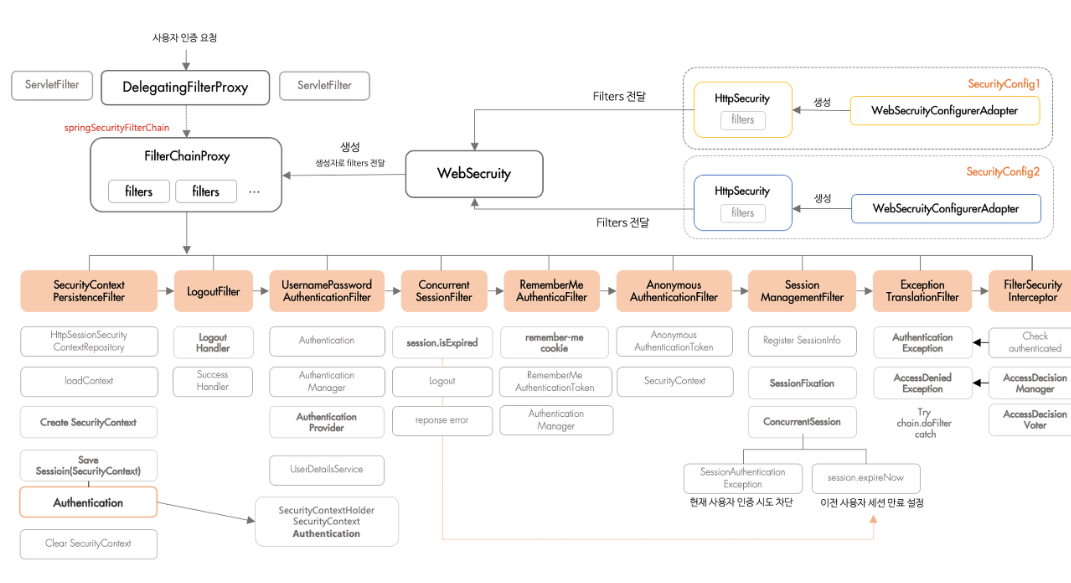
이전에는 로그인과정에서 SecurityFilterChain의 동작과정에 대해서 알아보았다.
UsernamePasswordAuthenticationFilter와 같은 AuthenticationFilter는 로그인 요청 시에만 동작하며, 로그인 요청 시에는 이 필터가 인증 및 로그인 요청을 처리하고 SecurityFilterChain의 과정을 끝낸다.
그렇다면 로그인이 아니라 일반적인 인증과정에서는 AuthenticationFilter의 뒷단에 있는 필터들이 동작한다. 이번에는 이것을 알아보려한다.
필터의 흐름
Spring Security는 기본적으로 모든 인증에 대해서 필터를 통과하도록시킨다. config에서 permitAll()로 설정된 요청들에 대해서까지 모두 필터를 거치게한다.
SecurityContextHolderFilter와 LogoutFilter까지는 로그인요청과 동일하게 동작한다. SecurityContextHolder를 가져오고, 로그아웃을 처리하고. 만약 기존에 인증을 거친 사용자의 경우에는 SecurityContextHolder에 Authentication 객체가 있을 것이다.
ConcurrentSessionFilter
세션로그인을 사용할 경우, 사용자의 세션이 만료되었는지 확인한다. 세션이 없을 경우에도 오류를 발생시키지 않고 다음 필터로 넘긴다. 로그인 실패 처리를 할 경우 세션을 만료시키는 방향으로 로그인 실패를 처리하는데, 이를 감지하기 위해서 여러 번 ConcurrentSessionFilter가 동작한다.
만약 세션이 만료된 경우라면 SecurityContextHolder에 있는 Authentication 객체가 쓸모없어지므로 null로 채운다.
RememberMeAuthenticationFilter
[백엔드] 로그인 시의 SecurityFilterChain의 동작과정
https://dev-dx2d2y-log.tistory.com/217 [백엔드] Spring Security 첫 걸음 - DelegatingFilterProxy, FilterChainProxy로 Web Context Filter에 Spring Bean Filter 등DelegatingFilterProxy그 전에 그냥 HTTP 요청이 어떻게 처리되냐면..클라
dev-dx2d2y-log.tistory.com
이전에 로그인에서의 인증필터들에 대해서 공부할 때 RememberMe 토큰을 사용한다고했다.
RememberMe 토큰 역시 쿠키에 저장되는 인증정보로, 일반적으로 세션에 저장되는 인증정보보다 쿠키 저장기간이 훨씬 길다. 로그인할 때 "이 계정 기억하기" 뭐 이런 버튼을 누르면 활성화된다.

저번에 다룬 로그인 처리과정인데..
인증에 실패한 경우 RememberMe 토큰을 제거하고, 인증에 성공한 경우, 그리고 RememberMe 토큰 사용을 활성화한 경우에는 RememberMe 토큰을 발급해 쿠키에 달아둔다.
RememberMeAuthenticationFilter는 ConcurrentSessionFilter에서 세션이 만료되었거나, 세션이 없어서 Authentication 객체가 null로 들어온 경우, 또는 세션 기능이 꺼진 경우에 동작한다.
RememberMeAuthenticationFilter는 세션이 없거나 만료되는 등, 모종의 사유로 세션인증에 실패해서 SecurityContextHolder에 Authentication 객체가 없는 경우, RememberMe 토큰이 있는지 확인한다. 만약 있다면, 토큰을 가져온다.
Token 기반 RememberMe 토큰인증
base64(username + ":" + expirationTime + ":" + algorithmName + ":"
algorithmHex(username + ":" + expirationTime + ":" password + ":" + key))

username:          As identifiable to the UserDetailsService
password:          That matches the one in the retrieved UserDetails
expirationTime:    The date and time when the remember-me token expires, expressed in milliseconds
key:               A private key to prevent modification of the remember-me token
algorithmName:     The algorithm used to generate and to verify the remember-me token signature
RememberMe 토큰은 위와 같은 구조를 가지고있다. base64 인코딩을 통해 이루어진다. 검증방식은 JWT토큰과 비슷한데,
RememberMeAuthenticationFliter에서는 RememberMeServices를 통해서 사용자의 정보를 가져온다. RememberMeServices의 구현체인 TokenBasedRememberMeServices에서는 아예 생성자로 UserDetailsService를 넘겨주어, UserDetailsServices가 RememberMe 토큰에 있는 username을 기반으로 UserDetails 구현체를 찾아와야한다. 여기서는 인메모리 방식이나, JDBC 방식을 사용해서 구성을 하든 자유. 그냥 유저를 저장소에서 잘 찾아오기만하면 된다.
RememberMeServices에서는 받아온 UserDetails 객체를 가지고 username, password를 가지고 해시알고리즘을 거쳐서 새로운 서명값을 만들어낸다. 여기서 key값은 RemememberMeService가 가지고있는 인스턴스값으로, 생성자에서 넘겨주어야하며, expirationTime은 기본 토큰에서 가져올 수 있다. algorithmName은 따로 설정할 수 있으며, 기본설정값은 SHA-256이다.
기존 토큰에 있는 서명값과 새로운 서명값을 비교해서 일치하다면 토큰에 문제가 없으므로 UserDetails 객체로 Authentication ㄱ개체를 만들어 반환하고, 다르다면 위조가 된 것이므로 에러를 일으킨다.
RememberMeFilter에서는 RememberMeServices를 호출해 Authentication 객체를 받은 후 (제대로 처리가 된 경우) Authentication 객체로 AuthenticationManager에게 해당 Authenticaion 객체에 대한 인증을 요구한다. 이 때, AuthenticationProvider는 RememberMeAuthenticationProvider와 같이 RememberMe 토큰용 AuthenticationProvider를 사용하며, 그렇기 때문에 SecurityConfig에서 미리 AuthentiationProvider를 AuthenticationManager에게 넘겨주어야한다.
@Override
public @Nullable Authentication authenticate(Authentication authentication) throws AuthenticationException {
    if (!supports(authentication.getClass())) {
        null;
    }
	if (this.key.hashCode() != ((RememberMeAuthenticationToken) authentication).getKeyHash()) {
	    throw new BadCredentialsException(this.messages.getMessage("RememberMeAuthenticationProvider.incorrectKey",
		    "The presented RememberMeAuthenticationToken does not contain the expected key"));
    }
    return authentication;
}
스프링의 기본 RememberMeAuthenticationProvider의 authentication 메서드는 그렇게 복잡한 편이 아닌데, 어차피 RemembeMe 토큰의 발급은 로그인 성공 후에만 발급하고, 로그인 실패 시에는 삭제하므로 RememberMe 토큰은 인증된 사용자라는 것이 자명하기 때문이다.
@Bean
RememberMeAuthenticationFilter rememberMeFilter() {
    RememberMeAuthenticationFilter rememberMeFilter = new RememberMeAuthenticationFilter();
    rememberMeFilter.setRememberMeServices(rememberMeServices());
    rememberMeFilter.setAuthenticationManager(theAuthenticationManager);
    return rememberMeFilter;
}

@Bean
TokenBasedRememberMeServices rememberMeServices() {
    TokenBasedRememberMeServices rememberMeServices = new TokenBasedRememberMeServices();
    rememberMeServices.setUserDetailsService(myUserDetailsService);
    rememberMeServices.setKey("springRocks");
    return rememberMeServices;
}

@Bean
RememberMeAuthenticationProvider rememberMeAuthenticationProvider() {
    RememberMeAuthenticationProvider rememberMeAuthenticationProvider = new RememberMeAuthenticationProvider();
    rememberMeAuthenticationProvider.setKey("springRocks");
    return rememberMeAuthenticationProvider;
}
이렇게 RememberMeFilter, RememberMeServices, RememberMeAuthenticationProvider에는 여러 생성자값도 필요하고, 여러 인스턴스 변수들을 사전에 설정해주고 넘어가야한다.
key값은 여기서 사전설정되는 값이며, RememberMeAuthenticationProvider에서 설정한 값과, RememberMeService에서 지정한 Authenticaion 객체 내에 저장된 keyHash 변수의 값이 다르다면 RememberMe토큰이 위조된 것으로 판단해 오류를 일으키는 것이다. 만약 같다면 성공적으로 인증이 진행된 것으로친다. 왜냐하면 RememberMe 토큰에 있는 유저는 이미 인증에 성공한 유저니까.
PersistentToken 기반 RemembeMe 토큰인증
이외에도, PersistentTokenBasedRememberMeServices가 있는데, 동작방식은 TokenBasedRememberMeServices와 비슷하지만, 보안성이 더 높다고한다.
DB에서는 사용자마다 고유의 series 값을 부여하고, DB에 저장한다. 따라서 기존 토큰에는 username, 암호화되긴 했지만 password까지 들어있었는데, 이제는 쿠키에는 series 값을 사용하고, 외부에 노출될 일이 없다.
유저가 로그인에 성공할 때마다 서버는 랜덤한 값을 생성해 토큰을 만든 후 series:token 형태로 쿠키에 달아놓는다. 그리고 DB에는 series, username과 함께 사용자가 발급한 토큰, 최근발급일을 같이 저장한다.
만약 유저가 요청을 보내고, RememberMe 토큰을 사용해야한다면, 서버는 series 값을 통해 DB에서 사용자를 찾고, 토큰값과 최근발급일을 확인해 유저가 보낸 요청에서의 토큰이 최근발급한 토큰이 아니면 토큰이 탈취되었다고 판단해 에러를 일으키고 서버는 해당 사용자에게 발급된 모든 토큰을 없애고 다시 로그인을 요청한다.
따라서 이런 방식은 쿠키에 정보를 최소한으로 달아두고, 토큰이 탈취된 경우까지 방지할 수 있다는 장점이 있다.
AnonymousAuthenticationFilter
여기까지 넘어왔는데 SeurityContextHolder에 Authentication 객체 부분이 비어있다면, 해당 유저는 세션에 유저정보도 없고, RememberMe 토큰도 없는, 완전히 미인증 사용자라는 뜻이다.
따라서 AnonymousAuthenticationFilter에서는 이런 사용자의 경우 빈 Authentication 객체를 넣어 해당 사용자가 익명의 사용자라는 것을 의미하게한다.
	private String key;

	private Object principal;

	private List<GrantedAuthority> authorities;
AnonymousAuthenticationFilter가 생성하는 Authenticaion 구현체는 AnonymousAuthenticationToken이며, 이것이 Authentication 객체의 역할을하게된다. 위의 key, principal, authorities가 AnonymousAuthenticaionToken에 들어간다. ROLE에는 ROLE_ANONYMOUS가 들어간다.
Authentication 객체를 비우지 않고 AnonymousAuthenticationFilter를 사용하는 이유는 NPE를 방지하기도 위함이지만, 만약 이 필터가 동작하지 않으면 비로그인 사용자의 경우에는 NPE 검사를 따로 진행해야한다. 만약 이 필터가 동작한다면 ROLE_ANONYMOUS만 검사하면되므로 같은 흐름에서 비로그인 사용자의 ROLE 검사를 진행할 수 있다. 또 시스템 전반에서 Authentication 객체를 사용하는데 비로그인 사용자라고 Authentication 객체를 안 가지면 이레귤러 케이스가 좀 많아지기도하고. 최대한 비슷한 상황에서 권한을 다루기 위해서 이 필터를 거치게된다.
SessionManagementFilter
여기서는 세션에 대한 관리를 해준다. 여기까지 인증을 마친 사용자는 이제 세션에 인증정보를 등록하게되는데, 세션 정보를 등록, 조회, 삭제 등에 대한 기능을 담당하며, 추가적인 세션 정책도 관리한다.
최대로 접속 가능한 세션의 수를 조작하고, 매 인증 때마다 새로 세션을 발급하여 세션 고정 공격 (Session fixation Attack)도 방지한다.
https://seungyong.tistory.com/44
세션고정 취약점 및 보호 정책
세션 인증의 동작원리 세션인증은 다음과 같은 방법으로 이루어집니다. 1. 로그인요청 2. 로그인 성공 시 세션발급(사용자 정보 저장) 3. 해당 세션에 매핑되는 세션id를 쿠키에 심어 클라이언트
seungyong.tistory.com
세션고정에 대한 글.. 세션고정을 막는 방법은 매번 새로운 세션을 발급해주면된다.
따라서 세션과 관련된 여러 기능을 담당하며, 여기서 최대 접속 가능한 세션의 수를 넘어선 경우 특정 세션을 만료시킨다. (최근 접속한 세션이나 가장 처음 접속한 세션 등 만료할 세션을 고르는 것을 사용자 자유) 그래서 SessionManagementFilter가 동작이 끝나면 다시 ConcurrentSessionFilter가 동작하여 세션의 만료여부를 판단하게 된다.
이미 접속 중인 세션을 만료시키면 만료된 세션이 보내는 다음 요청에서 ConcurrentSessionFilter가 세션 만료를 인지한다.
ExceptionTranslationFilter
여기까지 정상적으로 왔다면 이제 필터체인은 끝났고, 비즈니스 로직을 진행시켜야한다. 이것을 AuthorizationFilter에서 담당하는데, 여기서 오류가 발생한 경우 이 오류를 잡아서 일괄적으로 처리하기 위해 ExceptionTranslationFilter가 존재한다.
https://dev-dx2d2y-log.tistory.com/217#%EC%98%88%EC%99%B8%EC%B2%98%EB%A6%AC-1-3
[백엔드] Spring Security 첫 걸음 - DelegatingFilterProxy, FilterChainProxy로 Web Context Filter에 Spring Bean Filter 등
DelegatingFilterProxy그 전에 그냥 HTTP 요청이 어떻게 처리되냐면..클라이언트로부터 요청이 들어오면 HttpServletRequest, HttpServletResponse 객체가 생성되며, 이 객체는 필터들을 통과하며 조건에 부합하는
dev-dx2d2y-log.tistory.com
이미 한 번 다뤘다.
https://dev-dx2d2y-log.tistory.com/216
[골든리포트!] 6) 필터체인에서 JWT필터 인증 처리하기
몇 가지 수정사항이 생겼다.GDG 플젝트랙에서는 모든 경로를 permitAll() 해주고 인증이 필요한 요청에 대해 헤더에 있는 JWT 토큰을 검사하는 방식으로 구현했다. 물론 이 방식은 딱히 좋은 편이 아
dev-dx2d2y-log.tistory.com
직접 만져보기도했고.
AuthorizationFilter
접근에 특정 권한이 필요한 페이지에 요청을 보낼 시 해당유저가 접근권한이 있는지 판단하는 기능을 담당한다. 필터체인들 중에서 가장 마지막으로 동작한다.
기존에는 SpringSecurityInterceptor가 이를 담당했지만, 스프링 5.8부터 Deprecated 됐으며, 스프링 7에서는 완전제거되었다. 최종적인 인가과정을 담당한다.
http
    .authorizeHttpRequests(auth -> auth
    .requestMatchers("/",
        "/css/**",
        "/js/**",
        "/images/**",
        "/favicon.ico/**",
        "/h2-console/**",
        "/signup/**",
        "/oauth2/**").permitAll()
    .requestMatchers(HttpMethod.GET, "/review/**").permitAll()
    .anyRequest().authenticated()
)
SecurityConfig에서 이렇게 설정들을 다뤘는데, 이 설정들을 참고하는 것이 바로 AuthorizationFilter다.
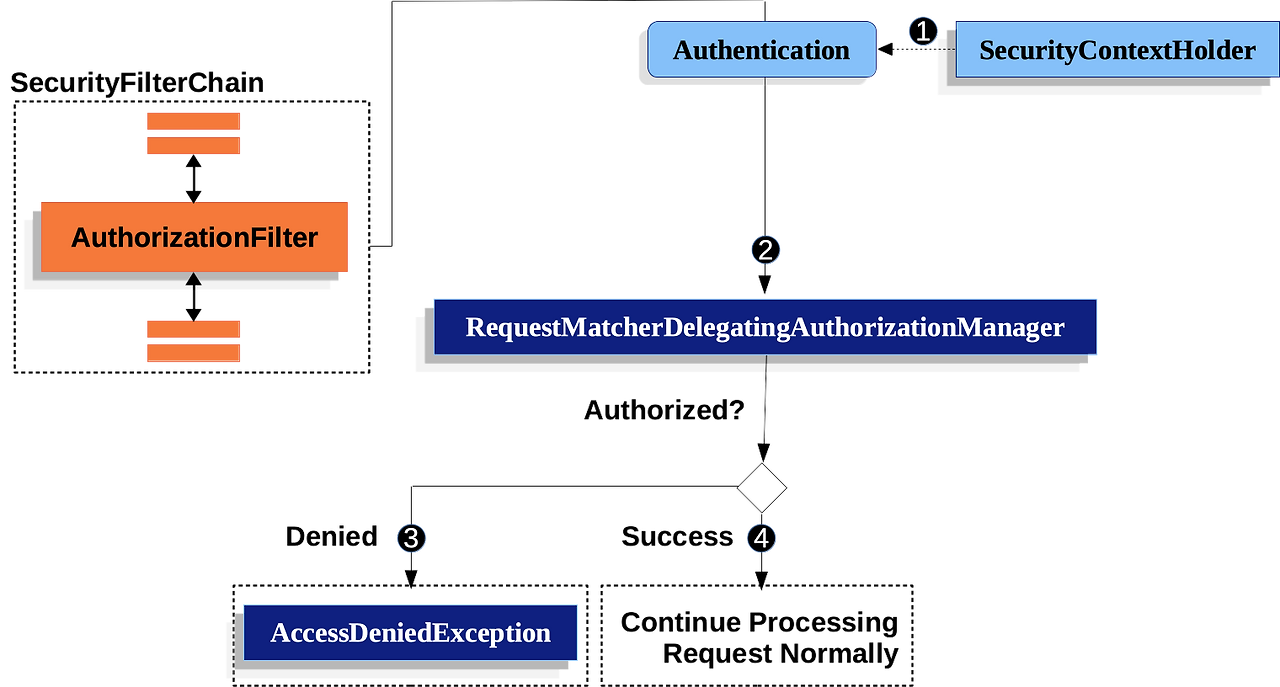
1. 가장먼저 SecurityContextHolder에서 앞선 과정에서 정리한 Authentication 객체를 가져온다.
2. AuthorizationManager에서 인가를 처리한다. 앞서 SecurityConfig에서 설정한 URL이 맞는지, 그것과 설정한 ROLE이 맞는지 등을 검사한다. 만약 Authentication 객체에 있는 인증정보가 URL이 요구하는 인증정보에 부합하지 않다면 AccessDeniedException을 던W지고, 만약 인가에 성공하면 다음 과정을 제대로 처리한다.
이런 AuthorizationFilter는 매 요청이 아니라, 매 dispatch마다 실행된다. 즉, 매 요청이 아니라 URL 포워딩이나 에러 반환 등에도 적용된다는 뜻이다.
Authorization Architecture :: Spring Security
It is a common requirement that a particular role in an application should automatically "include" other roles. For example, in an application which has the concept of an "admin" and a "user" role, you may want an admin to be able to do everything a normal
docs.spring.io
직접 커스텀하는 경우는 여기 참고
아무튼 여기까지 인증과정에서의 스프링 필터체인에 대해서 알아보았다.
과정은
1. SecurityContextHolderFilter가 SecurityContextHolder를 가져온다.
2. 로그인 요청이 아니라면 AuthenticationFilter 부분은 무시된다.
3. ConcurrentSessionFilter가 동작해 해당 세션이 만료되었는지 여부를 검사한다.
4. 만약 Authentication 객체가 SecurityContextHolder 내부에 없다면 (그러니까 미인증사용자라면) RememberMeAuthenticationFilter가 동작하도록 설정한 경우 동작한다. RememberMe 토큰 여부를 검사하고 만약 토큰이 있고, 유효하다면 Authentication 객체를 만들어서 SecurityContextHolder에 넣는다.
5. 만약 여기서도 Authentication 객체가 비어있다면, 비로그인 사용자이므로 이를 구분하기 위해 AnonymousAuthenticationFilter가 동작해 비로그인 유저용 Authentication 객체를 만든다. 이 때 ROLE은 ROLE_ANONYMOUS로 채워진다.
6. SessionManagementFilter가 동작하여 세션설정에 대해서 다룬다. 서버에서 설정한 것보다 많은 세션에서 로그인 중이라면 몇 개의 세션을 만료시킨다. SessionManagementFilter가 동작하면 ConcurrentSessionFilter가 다시 동작해 세션의 만료여부를 다시 검사한다.
7. ExceptionTranslationFilter가 동작한다. 처음에는 그냥 아무작업도 거치지않으나 하위필터에서 오류가 발생하면 잡아낸다.
8. AuthorizationFilter가 동작해 준비된 Authentication 객체와 SecurityConfig에서 작성정보, 그리고 유저가 보낸 요청들을 대조해 해당 유저가 요청을 보낼 권한이 있는지 여부를 검사한다. 만약 권한이 없다면 에러를 던지고, ExceptionTranslationFilter에서 잡아낸다.
이런 방식으로 동작한다.
내가 만든 JWT토큰 인증방식에 대입해보면..
1번은 동일하다.
2. AuthenticationFilter가 동작하기 전에 (어차피 무시될 것이지만) JwtAuthorizationFilter가 동작한다. 여기서 쿠키에 JWT토큰을 가져와 JWT토큰의 유효성을 검사하고 Authentication 객체를 만들어 SecurityContextHolder에 저장한 후 다음 필터로 넘긴다. 만약 쿠키가 비어있거나 JWT토큰이 없다면 다음 필터로 바로 넘기고, JWT토큰이 만료되었다면 별도의 에러를 던진다.
3. AuthenticationFilter는 동작하지 않고, ConcurrentSessionFilter가 동작한다. 여기서는 세션을 사용하지 않으므로 ConcurrentSessionFilter가 별도의 이상을 발생시키지 않는다.
4. Authentication 객체가 SecurityContextHolder 내부에 없다면, RememberMeAuthenticatinoFilter가 동작해야하지만 나는 별도의 설정을 하지 않았고, 세션기능도 꺼놨으므로 동작하지 않는다.
5. 여기서도 Authentication 객체가 비어있다면, AnonymousAuthenticationFilter가 동작한다.
6. SessionManagementFilter가 동작하지만 세션기능이 꺼져있으므로 별다른 기능을 하지 않는다. 이는 이후에 동작하는 ConcurrentSessionFilter도 마찬가지.
7. ExceptionTranslationFilter가 동작한다.
8. AuthorizationFilter가 동작한다. permitAll()된 요청이라면 비로그인 사용자라도 통과시킬 것이다. 별도의 인증을 요구하면 Authentication 객체에 저장된 ROLE 속성을 볼 것이다. 만약 ROLE_ANONYMOUS라면 불허. 별도의 권한을 요구할 때에도 ROLE 속성을 볼 것이다.
'CS > 백엔드' 카테고리의 다른 글
| [백엔드] 스프링 컴포넌트 스캔과 Bean 등록하기 및 DI (0) | 2026.03.16 |
|---|---|
| [백엔드] 로그인 시의 SecurityFilterChain의 동작과정 (0) | 2026.02.16 |
| [백엔드] Spring Security 첫 걸음 - DelegatingFilterProxy, FilterChainProxy로 Web Context Filter에 Spring Bean Filter 등록하기 (0) | 2026.02.14 |
| [백엔드] OAuth는 어떻게 진행되는가? (0) | 2026.02.06 |
| [BckEnd] 스프링없이 순수JDK로 간단한 개발해보기 (0) | 2026.01.04 |